Cinel AI
Prompts
All promptsBrowse the full libraryPortrait & HeadshotProduct & E-commercePosters, Logos & Graphic DesignInfographics & UI3D Characters & FigurinesFood & DrinkIllustration & AnimeCreative Scenes
AI Image
Free AI Image GeneratorCreate images from text promptsText to Image GeneratorCreate images from text promptsAI Image to Image GeneratorGenerate from reference imagesAI Image EditorEdit existing images with textBackground RemoverRemove backgrounds instantlyImage UpscalerUpscale images 2x or 4xAI UncropExpand images beyond their borders
AI Video
AI Video GeneratorOpen the video generation workspaceText to Video GeneratorCreate videos from text promptsImage to VideoAnimate reference images
AI Models

Image models

KolorsFree Kolors image creation with prompt and reference support.Z-Image TurboFast photoreal generation with bilingual text accuracy.Seedream 4.0Cost-efficient 1K, 2K and 4K visuals with multi-reference editing.Seedream 4.54K generation, text rendering and reference editing.Seedream 5.0 LiteCinematic 3K realism with multi-reference creative direction.Seedream 5 Pro1K fast, 1.5K lightweight, or 2K professional visuals with text and references.GPT Image 2Precise prompts, clean text and polished product shots.GPT Image 2.5Faster GPT Image generation with sharper, consistent edits.Nano Banana 2 LiteFast 1K generation and editing for high-volume iteration.Nano Banana 2Multi-reference edits with fast style control.Nano Banana Pro4K renders and advanced image editing.Nano BananaLightweight Gemini edits for quick changes.

Video models

Seedance 1.0 TurboFast video generation with smooth motion, up to 1080p.Seedance 2.54–30 second video with synchronized audio, 480p or 720p.Seedance 2.0 MiniLower-cost 4–15 second video with synchronized audio, 480p or 720p.Seedance 2.04–15 second video with Fast or Standard mode, up to 1080p.MiniMax H3High-fidelity 4–15 second video with image and reference support.Kling 3.0Strong motion, camera moves and optional sound, up to 4K.Kling 3.0 TurboFaster 3–15 second video at 720p or 1080p, with first-frame input.Kling O1Kling O1 image-to-video with first and optional last frame input.Kling O3Kling O3 text-to-video and first/end-frame generation up to 4K.Grok Imagine Video 1.06–30 second beta video with Fun, Normal and Spicy style modes.Grok Imagine Video 1.51–15 second video with native audio and up to 7 image references.Wan 2.55–10 second text or single-image video with native audio.Wan 2.62–15 second multi-shot video with native audio at 720p or 1080p.Wan 2.72–15 second video with text, first/end frames and up to three image references.Veo 3.1 FastStable Fast Veo 3.1 with 4–8 second video, audio and frame input.Veo 3.1 ProStable Pro Veo 3.1 with 4–8 second video, audio and frame input.Veo 3.1 Fast BetaFast Beta 8-second video with first/end-frame or three-image reference input.Veo 3.1 Pro BetaPro Beta fixed 8-second video with first/end-frame input.Sora 24–12 second video with synchronized audio and one optional first-frame image.
Pricing
-50%Upgrade
  1. Prompts
  2. Infographics & UI
  3. Dark Fintech Dashboard UI Mockup Prompt

Premium Dark Fintech Trading Dashboard UI Mockup

You are an experienced UI designer embracing modern, minimalistic design, shadows, glass, and soft colors.

Your role is to create a professional, beautiful mockup that is ready for delivery based on these requirements: 

<requirements>
## 1. Overall Style & Visual Language
This interface represents a premium, modern fintech / crypto trading dashboard using a dark theme.  
The visual language combines **soft neumorphism**, and **luxury Web3 aesthetics**.

Core characteristics:
- Warm gold/orange accent highlights
- Monochromatic color palette with minimalistic effects and shadows
- Card-based layout with depth and subtle backgrounds
- Minimal borders, separation via shadows or light backgrounds

Target perception:
- Secure
- Professional
- High-end / institutional-grade
- Optimized for experienced traders

---

## 2. Layout Structure

### Global Layout
- Desktop-first dashboard
- Output proportions: 3:2
- Three main regions:
  1. Top navigation bar (horizontal)
  2. Left sidebar navigation (vertical)
  3. Main content area (multi-column grid of cards)

Spacing is generous, prioritizing clarity and visual breathing room.

---

## 3. Top Navigation Bar
- Height: 72px
- Left:
  -  "Mevolut"

  - Stylized "M"
  - Gold/orange accent
- Center:
  - Navigation links: Dashboard, Security, Referral, Trading Fees, API management
- Right:
  - Order link
  - Primary CTA: “Deposit” (gold pill button)
  - User avatar (circular)
  - Theme toggle (moon icon)

Typography:
- Clean sans-serif
- Medium weight
- White primary text, muted gray inactive states

---

## 4. Left Sidebar Navigation
- Width: 240px
- Background: near-black
- Vertical navigation items with icons:
  - Dashboard (active)
  - Security
  - Referral
  - Trading Fees
  - API management
- Bottom-aligned:
  - Settings

Active item:
- Subtle background highlight
- Slight background tint
- Rounded container

Icons:
- Outline style
- Gold accent on active state

---

## 5. Main Content Area

### 5.1 User Overview Card
- Large rounded card at top
- Left:
  - Circular avatar
  - Greeting text (“Hello…”)
  - User name
- Inline info blocks:
  - UID (copy icon)
  - Identity verification status
  - Security level
  - Time zone
  - Last login timestamp
- Right:
  - “Hide info” toggle

Style:
- Subtle inner shadows

---

### 5.2 Deposit / Buy Card
- Medium-sized card
- Title text explaining deposit options
- Two action rows:
  - Deposit (dollars or crypto)
  - Buy stocks (local currency)
- Each row:
  - Icon
  - Label
  - Arrow action button (gold accent)

---

### 5.3 Total Asset Card
- Displays USD balance and USD equivalent
- Large, faded Dollar symbol watermark in background
- Action tabs:
  - Buy stocks
  - Deposit
  - Withdraw
- Numeric values are large

---

### 5.4 VIP Level Card
- Shows current VIP level
- Spot and futures fee rates
- Progress bar for token holdings
- “View more” link

Progress bar:
- Rounded
- Dark background track

---

### 5.5 Current Holdings Table
- Card containing a table layout
- Columns:
  - Coin (icon + name)
  - Price
  - 24h Change
  - 4h Trend (sparkline)
  - Actions (Deposit, Withdraw, Trade)

Sparklines:
- Green for positive trend
- Red for negative trend

Hover:
- Subtle background highlight per row

---

### 5.6 Affiliate Program Card
- Promotional card
- Gold coin illustration
- Short description and CTA button (“Apply now”)

---

### 5.7 Information / News Card
- Vertical list of announcements
- Headline + timestamp
- “View more” link at top

---

## 6. Color Palette
- Primary background: deep charcoal / black
- Card surfaces: slightly lighter
- Accent color: warm gold
- Text hierarchy:
  - White (primary)
  - Muted gray (secondary)
  - Dark gray (disabled)
- Status colors:
  - Green for positive
  - Red for negative

---

## 7. Effects & Interaction
- Rounded corners throughout (sm)

# Design tokens:
{
  // Global theme definition
  "theme": {
    "mode": "dark",
    "style": [
      "soft-neumorphism",
      "premium-fintech"
    ]
  },

  // Layout measurements and structure
  "layout": {
    "type": "desktop-dashboard",
    "grid": "three-column",
    "sidebarWidth": 240,
    "topbarHeight": 68,
    "contentPadding": 24
  },

  // Color system
  "colors": {
    "background": "#0B0D10",        // Main app background
    "primaryAccent": "#F5A623",     // Gold/orange highlight
    "secondaryAccent": "#FFB547",
    "textPrimary": "#FFFFFF",
    "textSecondary": "#B0B3B8",
    "textMuted": "#6B6F76",
    "success": "#22C55E",
    "danger": "#EF4444"
  },

  // Typography scale
  "typography": {
    "fontFamily": "SF Pro, system-ui, sans-serif",
    "weights": {
      "heading": 600,
      "body": 400,
      "numeric": 500
    },
    "sizes": {
      "h1": 24,
      "h2": 20,
      "h3": 16,
      "body": 14,
      "caption": 12
    }
  },

  // Core UI components
  "components": {
    "card": {
      "borderRadius": 16,
      "shadow": "0 20px 40px rgba(0,0,0,0.4)",
      "border": "none",
      "background": "#14171C",
    },

    "button": {
      "primary": {
        "textColor": "#0B0D10",
        "borderRadius": 999,
      },
      "secondary": {
        "background": "transparent",
        "textColor": "#F5A623"
      }
    },

    "sidebar": {
      "background": "#0E1014",
      "itemRadius": 12,
      "iconStyle": "outline"
    },

    "table": {
      "rowHeight": 56,
      "divider": "subtle",
      "hoverHighlight": true,
      "sparkline": {
        "positiveColor": "#22C55E",
        "negativeColor": "#EF4444"
      }
    },

    "progressBar": {
      "height": 6,
      "radius": 999,
      "fillColor": "#22C55E",
      "backgroundColor": "#2A2E35"
    }
  },

  // Icon system
  "icons": {
    "style": "outline",
    "size": 18,
    "colorInactive": "#6B6F76",
    "colorActive": "#F5A623"
  }
}
</requirements>

2 credits for members at 1K, 4 with daily credits. Ratio 3:2.

MinimalArchitectureGridText in imageratio 3x2text only

Details

CategoryInfographics & UI
Aspect ratio3:2
InputText only
Example generated withGPT Image 2.5
Recommended modelsGPT Image 2.5, GPT Image 2, Nano Banana Pro, Nano Banana 2
Original author@d4m1n · Original post on X
Original modelnanobanana

Why this prompt works

This is less a prompt than a design spec: almost 6,000 characters covering visual language, target perception, global layout, then pixel-level details for the nav bar, sidebar and each card. That depth is why the output looks like a real product screen rather than a vague 'dashboard': our 3:2 render has a balance card, deposit and buy actions, a VIP tier panel, a holdings table with sparklines and an announcements list. Gold-orange accents on a monochrome dark base give the institutional feel the brief asks for. The fictional brand name in the spec plays on a real fintech name, so change it to your own. Rewrite the card list to mock up any SaaS dashboard.

How to adapt it

VariableWhat it changesExamples
Brand logo textproduct name in the top baryour app name, LEDGERLY
accent colourhighlight colourwarm gold/orange, electric teal
main content cardswidgets in the gridbalance, holdings, VIP level, MRR, churn, active users

Tips

  • Replace the brand name with your own; the spec's name echoes a real company.
  • Keep the explicit pixel heights and layout regions; they stop the model from cramming widgets.
  • For mobile screens, change 'desktop-first, 3:2' to 'mobile, 9:16' and cut the card list in half.

Related prompts

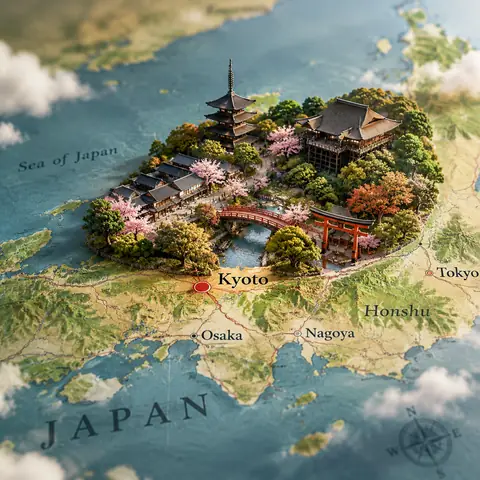
Map with a 3D City Diorama Rising from It Prompt1:1Map with a 3D City Diorama Rising from It Prompt@Kerroudjm
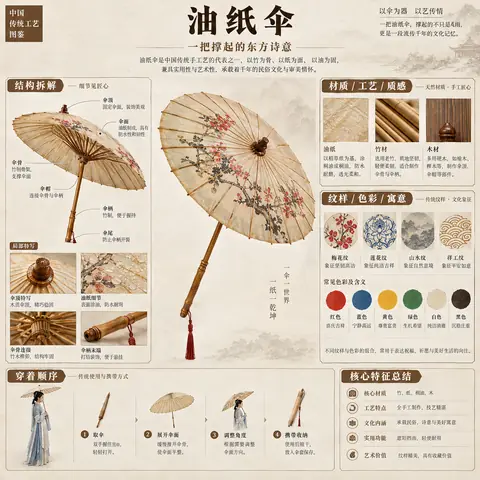
Museum-Style Chinese Heritage Breakdown Infographic1:1Museum-Style Chinese Heritage Breakdown Infographic@MrLarus
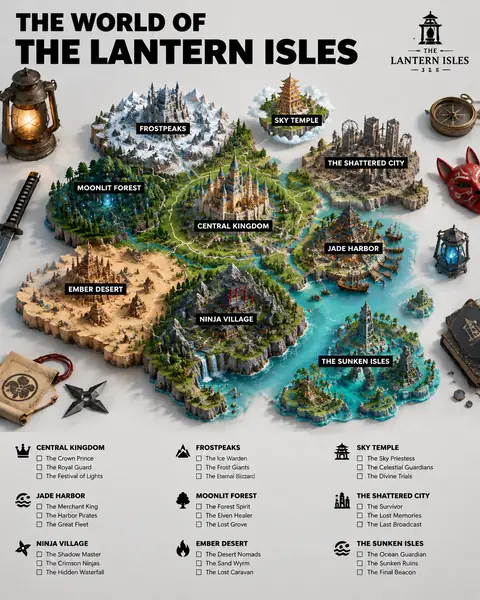
3D Fictional World Map Guide Poster Prompt4:53D Fictional World Map Guide Poster Prompt@TechieBySA
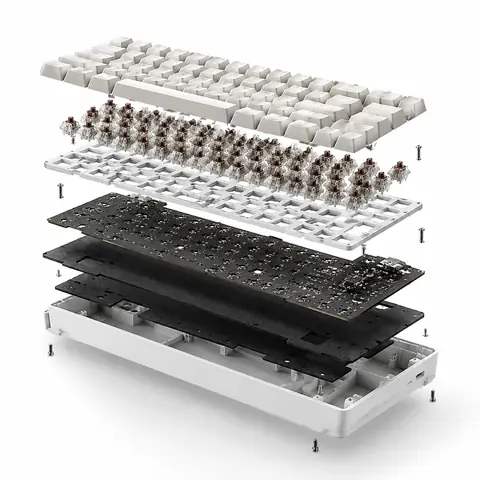
Exploded View Product Ad with Inner Mechanics1:1Exploded View Product Ad with Inner Mechanics@azed_ai
Blueprint to House Split Architectural Visualization3:4Blueprint to House Split Architectural Visualization@craftian_keskin
Landmark Photo with Blueprint Annotations Prompt1:1Landmark Photo with Blueprint Annotations Prompt@TechieBySA
Social Post Frame Pop-Out Fashion Portrait Prompt1:1Social Post Frame Pop-Out Fashion Portrait Prompt@Arminn_Ai
Industrial Packaging Design Presentation SheetReference1:1Industrial Packaging Design Presentation Sheet@noorwithwifi
Floating Dessert Stack with Gold Ingredient Labels3:4Floating Dessert Stack with Gold Ingredient Labels@meng_dagg695
Futuristic Desert Civilization Worldbuilding Set1:1Futuristic Desert Civilization Worldbuilding Set@aleenaamiir
Exaggerated 3D Caricature Character from a PhotoReference4:5Exaggerated 3D Caricature Character from a Photo@Naiknelofar788
Monochrome Men's Fashion Editorial TriptychReference1:1Monochrome Men's Fashion Editorial Triptych@harboriis
← PreviousMuseum-Style Chinese Heritage Breakdown InfographicNext →Map with a 3D City Diorama Rising from It Prompt
Cinel AI

Cinel AI is a free, unlimited AI text-to-image generator with prompt-based editing and AI image-to-video tools. Create images without signing up, edit with GPT Image 2, Seedream 5 Pro, and Nano Banana 2, then turn still frames into video with Seedance 2.5, Veo 3.1, and Kling 3.0.

ProductsFree AI Image GeneratorAI Video GeneratorImage TemplatesWorkspaceText to Image GeneratorImage to ImageText to Video GeneratorImage to VideoAI Image EditorBackground Remover
PromptsAll promptsPortrait & HeadshotProduct & E-commercePosters, Logos & Graphic DesignInfographics & UI3D Characters & FigurinesFood & DrinkIllustration & AnimeCreative ScenesGPT Image 2.5 promptsSources and takedown

AI Image Models

KolorsZ-Image TurboSeedream 4.0Seedream 4.5Seedream 5.0 LiteSeedream 5 ProGPT Image 2GPT Image 2.5Nano Banana 2 LiteNano Banana 2Nano Banana ProNano Banana

AI Video Models

Seedance 1.0 TurboSeedance 2.5Seedance 2.0 MiniSeedance 2.0MiniMax H3Kling 3.0Kling 3.0 TurboKling O1Kling O3Grok Imagine Video 1.0Grok Imagine Video 1.5Wan 2.5Wan 2.6Wan 2.7Veo 3.1 FastVeo 3.1 ProVeo 3.1 Fast BetaVeo 3.1 Pro BetaSora 2
CompanyPricingAboutContactsupport@cinel.aiPrivacyTermsAcceptable Use
© 2026 Cinel AI. All rights reserved.